
I went to visit Almiro Studios in southern Sweden at a racetrack to see how they capture motorsport racing from their custom-built OB truck. The team designed and built out this truck to their own spec and it really shows - it is built for purpose.
 Inside look of the OB truck
Transcript
The Truck Layout
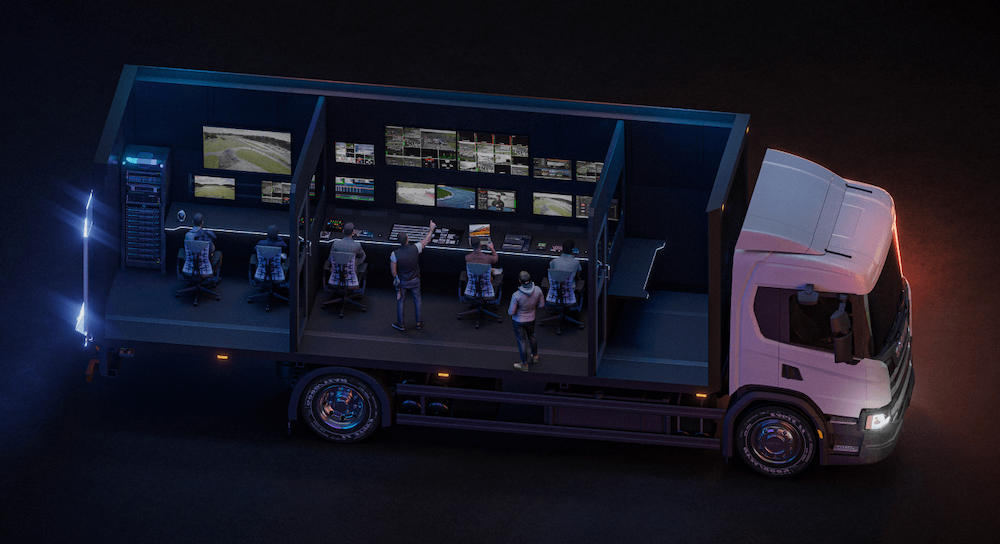
Inside the truck there are three main rooms. Up in the front there’s a spare room that’s earmarked for a future audio setup. Right now it was used for some editing on the day and it’s also perfect for just an extra person to sit and watch the show. Then you’ve got the main control room where most everything happens - replay, camera shading, switching, audio, graphics, it all is here. There’s also a third room for the commentators and the equipment rack right at the back of the truck. There are also windows between all the rooms, so everyone can see what’s going on and where people are. And this becomes really handy during busy races.
On the day I visited, there were back-to-back races, and each one seemed to be for a different client. So, they were busy switching between each race - the streaming destinations, the graphics packages, the color and branding, all that stuff going back to back throughout the day.
The Equipment Rack
At the back of the truck, right by the double doors is where the equipment rack is. And this is a pretty nice place for it because it gives good access for cables and for making changes on the fly. From top to bottom, we have a Blackmagic Multi-dock for footage offloading. The Talkback converter for camera talkback. A Millennium XLR in/out for getting audio in and out of the truck. The Blackmagic ATEM 2 M/E Constellation main switcher. Two HyperDecks and two Web Presenters for recording and streaming. Blackmagic SmartView monitor. A router specifically for all the monitors in the truck. A Blackmagic Multiview 16 for building custom multiview. Another router for all the incoming video signals and to push them around the truck. A whole sea of converters. An ATEM Mini Extreme ISO for ISO capturing. The Behringer X32 rack, which is the main audio system. And then a GFX and a vMix computer for graphics and replay.
Cameras
For most of the camera coverage, there were five Blackmagic Ursa cameras placed around the racetrack, all of which had a camera operator. All of these were connected back to the truck via fiber, which is very necessary for extremely long runs - some of these cameras were pretty far away.
In addition to that, they had an FPV drone capturing some really nice aerial footage. The pilot was set up on the roof of the truck, which was a nice vantage point and fun to see from afar.
There was also a wireless roaming camera, a Sony FX9 with a wireless transmitter. This was being used as a run-and-gun setup for getting some pre and post interviews as well as some shots from the racetrack and in the prep area.
And for some of the races, they had some in-car cameras sending footage back to the truck via SRT, which made for a really interesting angle.
Video Routing and Switching
All the camera feeds found their way into the truck and via the Smart Video Hub in the rack, they were routed to where they needed to go. The Ursa cameras were all shaded in the truck at the ATEM camera control panel which gave them nice control over how they looked, so the camera operators didn’t have to worry about any of that.
The ATEM Constellation 2 M/E was at the center of the video production. All the cameras were routed there as well as the replay. And this is where the final mix happened before recording and live streaming. With plenty of monitors in the main control room, the technical director could cut the show using all the camera angles they could possibly desire. And they were using a non-brand 4 M/E advanced panel - the kind you’d often see if you roam around NAB or IBC. It seemed to work really well.
Graphics
The graphics system is entirely self-built, specifically designed for the Almiro needs. It outputs HTML-based graphics and they’re keyed over the program feed in the ATEM. They’ve got a user interface to trigger all the different graphic elements and it has all the data - driver names, numbers, positions - all preloaded and ready to use when the race begins.
The graphics were all customized with colors and branding, done ahead of time. But the flexibility of not doing pre-rendered graphics means that you can make changes on the fly. And of course, graphics with live data like race positions need to stay live and up to date at the last minute.
Replay and Recording
Replay in this OB truck is all done via vMix. There were up to eight video streams coming into the vMix system, and at any time they could pull together highlight reels that would be played back right after a race finishes. For tactile control over the replay system, they had a Contour Shuttle Pro, which gives a nice jog and shuttle wheel for scrubbing through footage pretty quickly. Then when a race finished or the TD wanted some replay, they could just call for it and playback started.
For recording, things were fairly simple. There was a clean feed with no graphics and a program feed with all the graphics. However, there was also an ATEM Mini Extreme ISO in the rack, recording up to eight video feeds at any time. After a race finished, they could pull out the SSD and do a quick edit if needed from the client.
Throughout the day they were streaming to YouTube and some other live streaming platforms. So in the Blackmagic Web Presenter they could just change the URL and the key and away they go.
Audio
Audio for this particular race day was interesting because they didn’t have a dedicated person running audio. For the most part it was commentators speaking over the atmospheric sound coming from the racetrack. So the TD could make some changes if they really needed to throughout the day.
They had that Behringer X32 in the rack which was being controlled by the X-Touch in the main control room. The commentators had their headsets on with a commentator mic attached and they could commentate over the action. They could get signals from the main control room when to start and stop through that window between the two rooms.
Since all the Ursa cameras spread around the racetrack also have microphones, they were able to use those as the atmospheric sounds as racers drove around. The final audio source was a wireless mic attached to that Sony FX9 roaming camera so they could pick up interview audio as they walked around.
Comms
Keeping everyone in sync around a racetrack is super important. People get pretty far away and they can get really out of touch really fast. For this, they were using a combination of Hollyland as well as that Blackmagic Talkback converter in the rack. Since there was a fiber line going to each of the camera operators, they would get their talkback audio back to them through that and they could listen in headphones. And of course, there were plenty of good old phone calls going between the client, between the racetrack, between the truck just to keep things coordinated throughout the day.
And Then It Rained
And just like any other outside broadcast, we were at the mercy of the weather. All of a sudden, it started to rain. Everything had to stop for a while while we waited it out. And when the rain eased up, they could do a nice cleanup and get things back on track again. This is how it goes sometimes with outdoor productions, but it was fun to watch the machines come in and try to get the racetrack as clean as possible, the camera operators wiping down their lenses, all that good stuff.
Thanks and What’s Next
A big thanks to Almiro Studios for having me, allowing me to come along and capture all this footage. And thanks to Christopher specifically for helping arrange this and make it happen.
Things have changed since I visited - they’ve switched to DJI for the wireless video transmission, they’ve integrated Unity into their comms, and they’ve built out the audio room as well which is looking really good.
If you are based in Europe and you have an OB truck or venue or equipment that you want to show off and be in an episode of How They Operate, let me know. I’ll be doing some traveling around this year and I want to see your gear and make a video all about it.